

Know what your WooCommerce store actually keeps
Revenue is the easy number. Vantage shows you profit after cost of goods, payment fees and ad spend — and which of your campaigns is paying for the others.
No card requiredFree version on WordPress.orgRuns on your own server
The problem
WooCommerce tells you what you sold. Not what you kept.
Open Analytics and you get gross sales, refunds, coupons and net sales. Net sales is a real number — it is what you took after refunds and discounts. It is not profit.
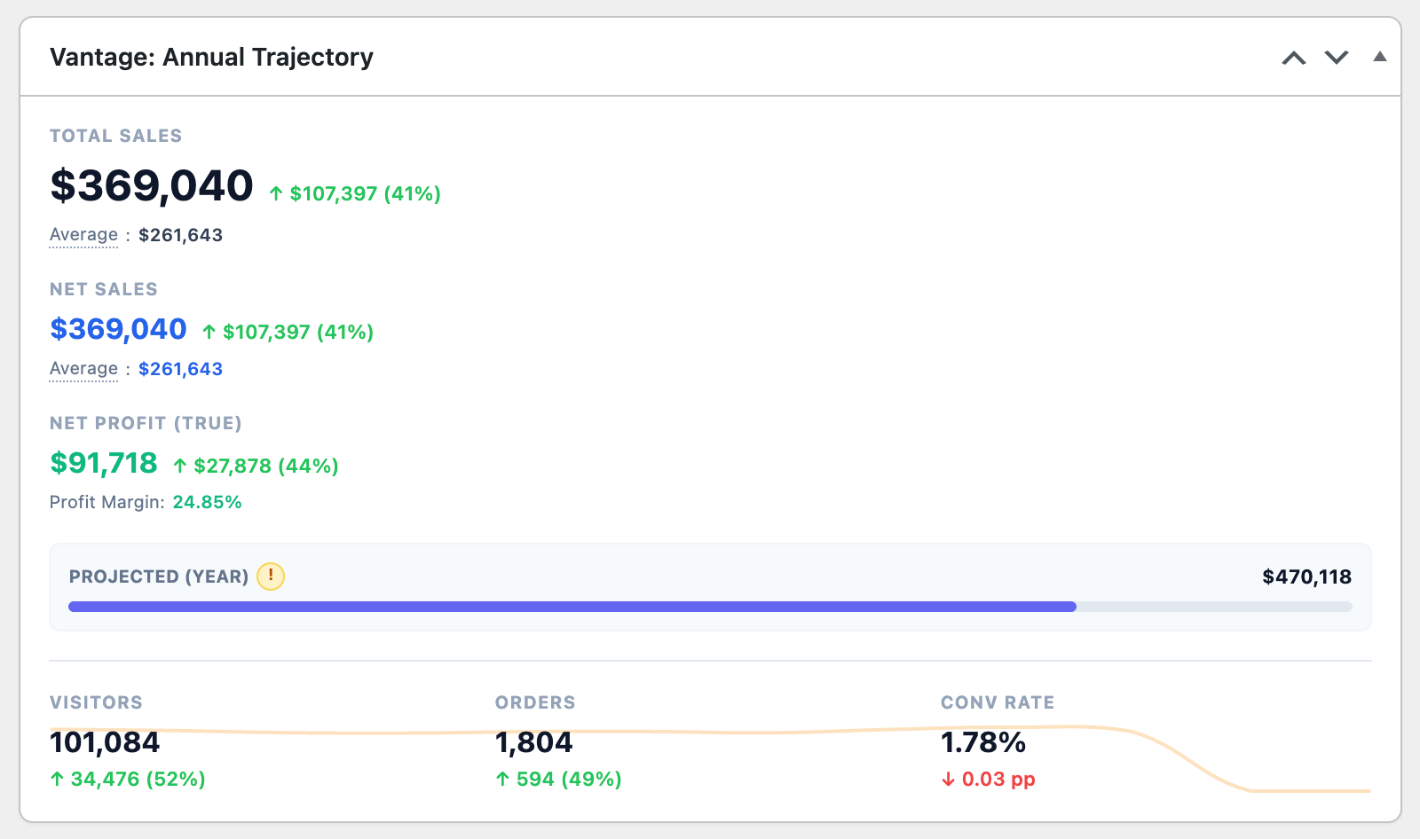
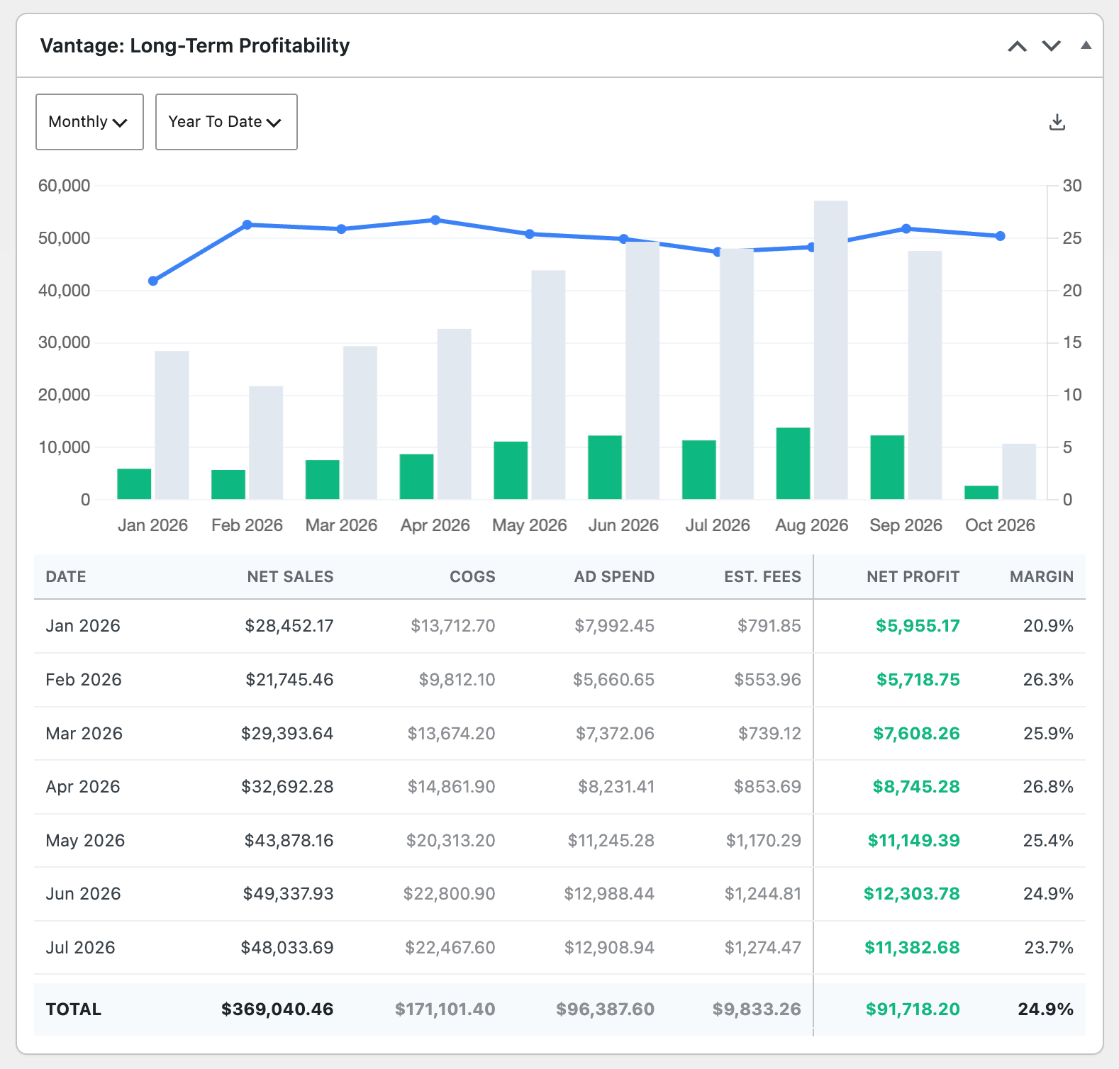
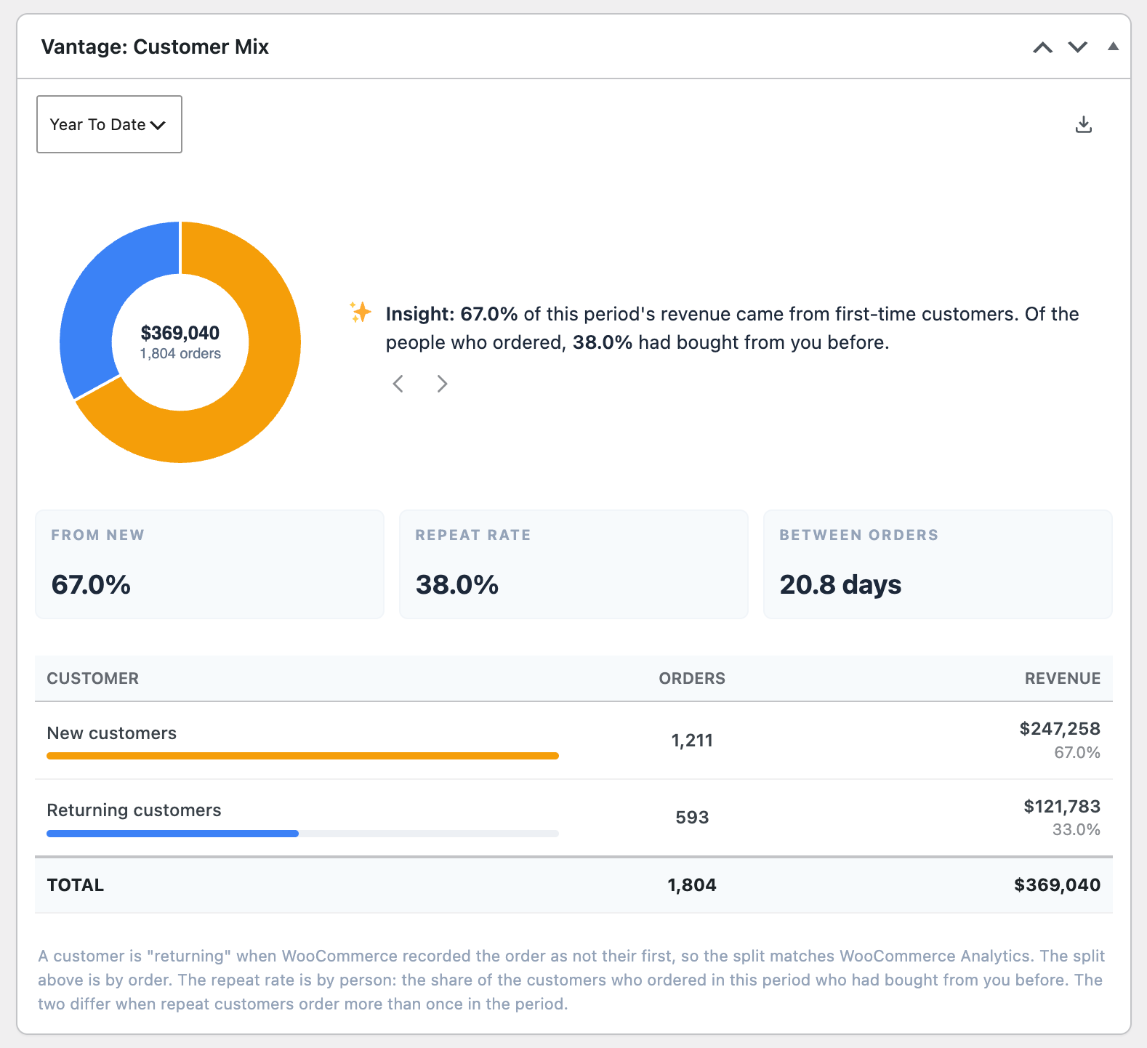
The demo store’s own year: $369,040 in net sales, and $91,718 left after the three things WooCommerce never counted. Those are the figures on the panels below.
What Ultimate adds
Three numbers the free version cannot give you
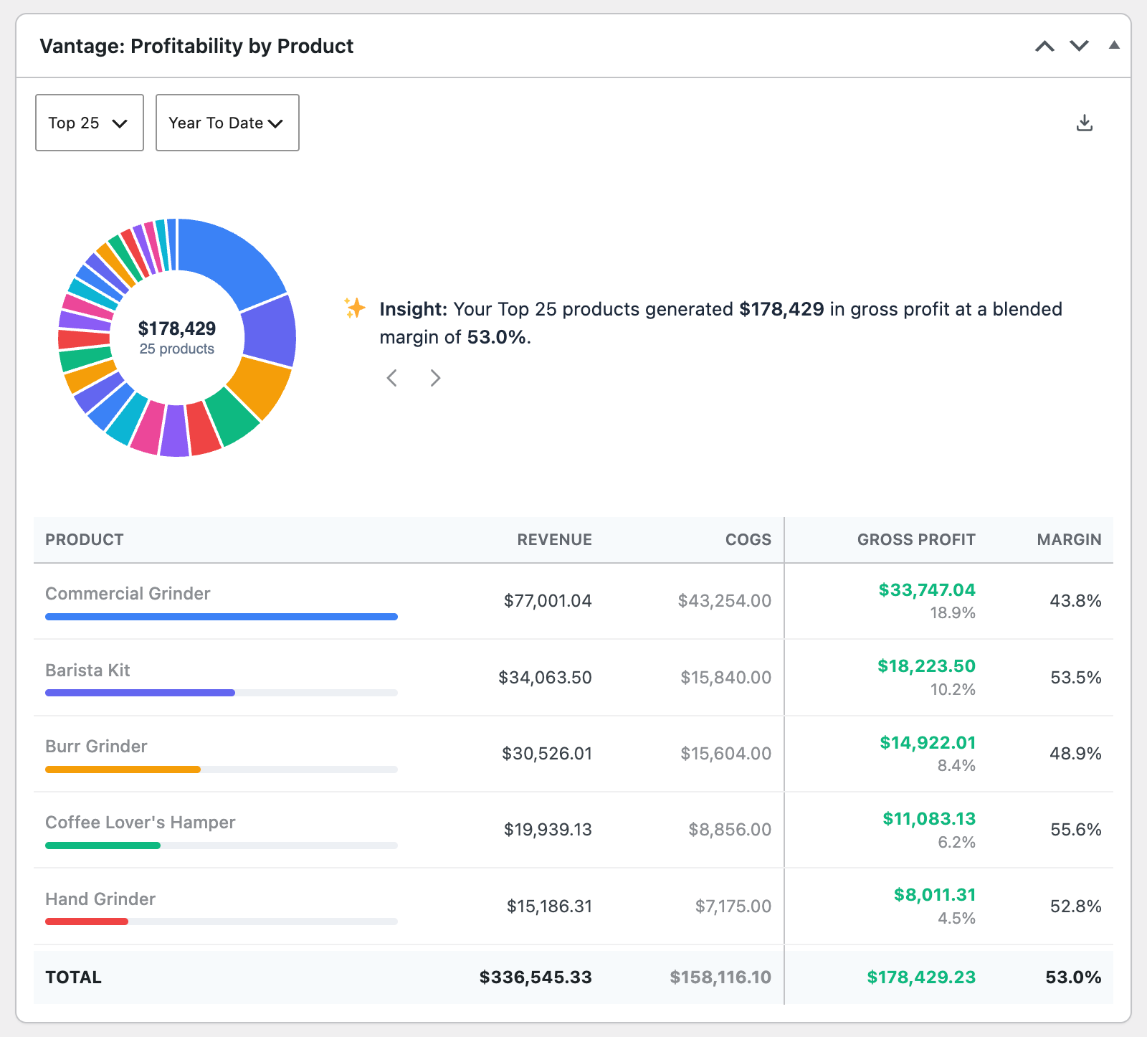
True net profit, per month and per product
Cost of goods is written onto each order line as the order is placed, so last year’s margins stay true when a supplier raises their price.
Ad spend against revenue, per network
MER in the headline, each network’s own attributed ROAS beneath its spend. A healthy blended figure routinely hides one platform selling nothing.
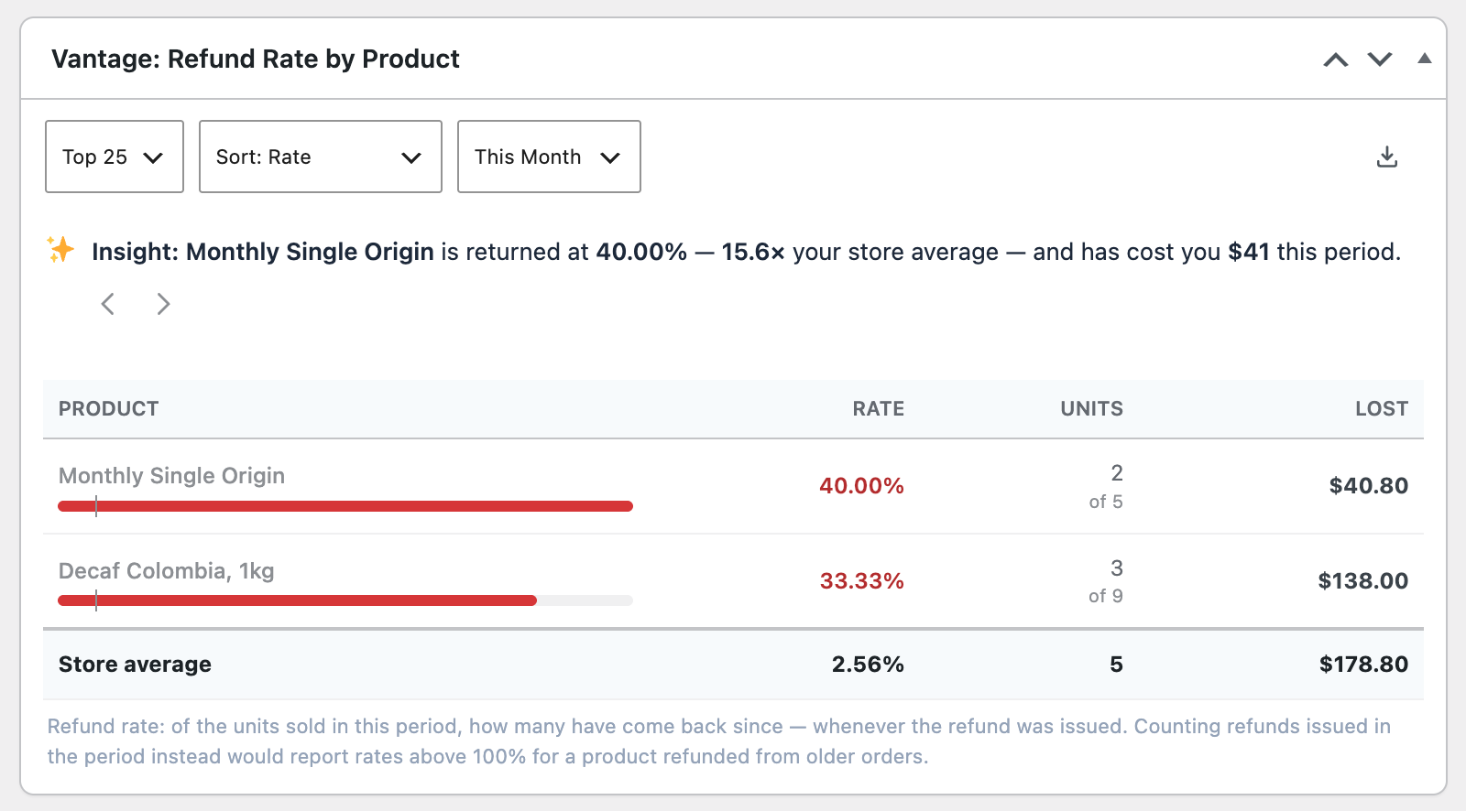
Refund rate by product, as a cohort
Of the units sold in a period, how many came back since. The screen that finds the product quietly eating a category’s margin.
The dashboard
Everything on one screen, in your own admin
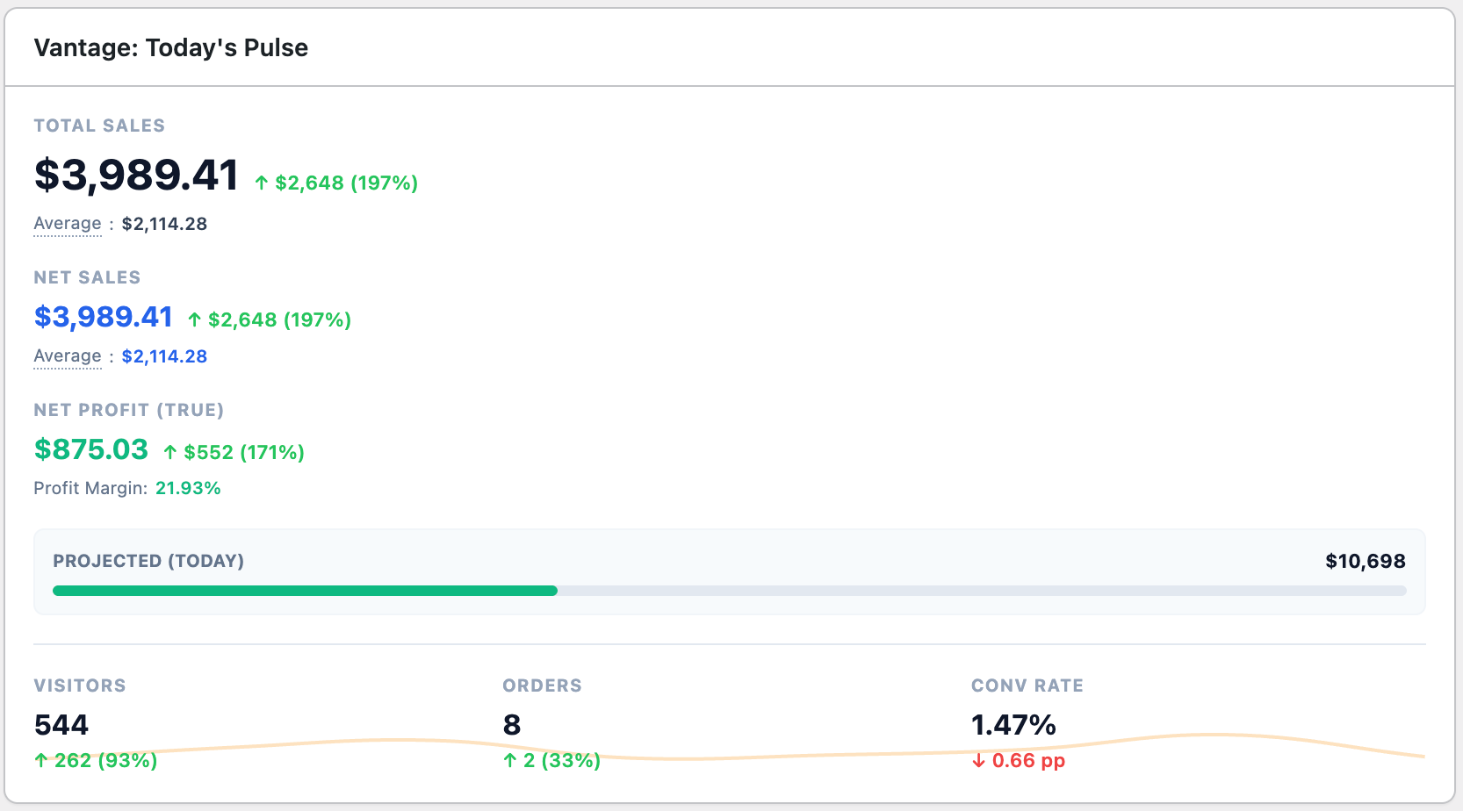
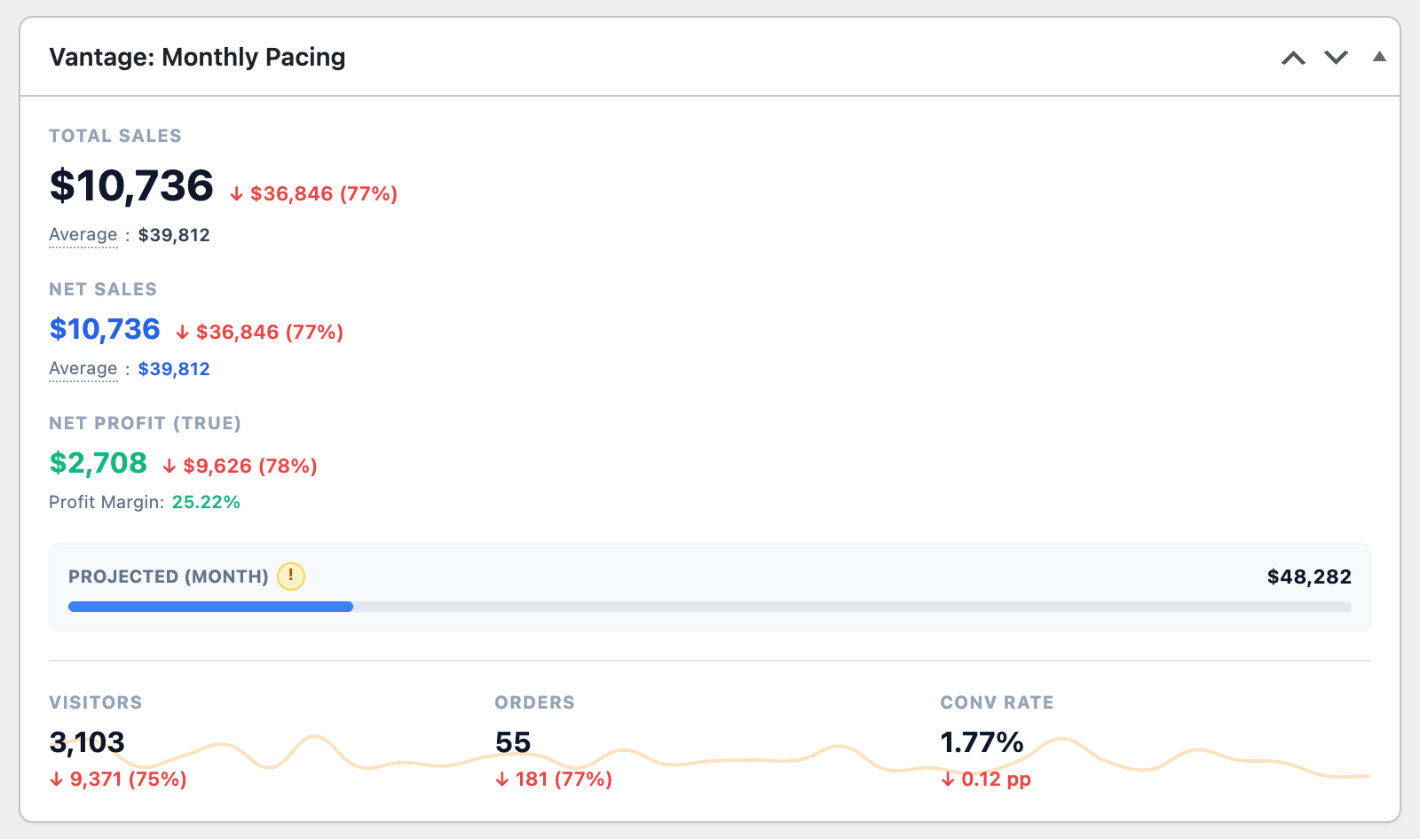
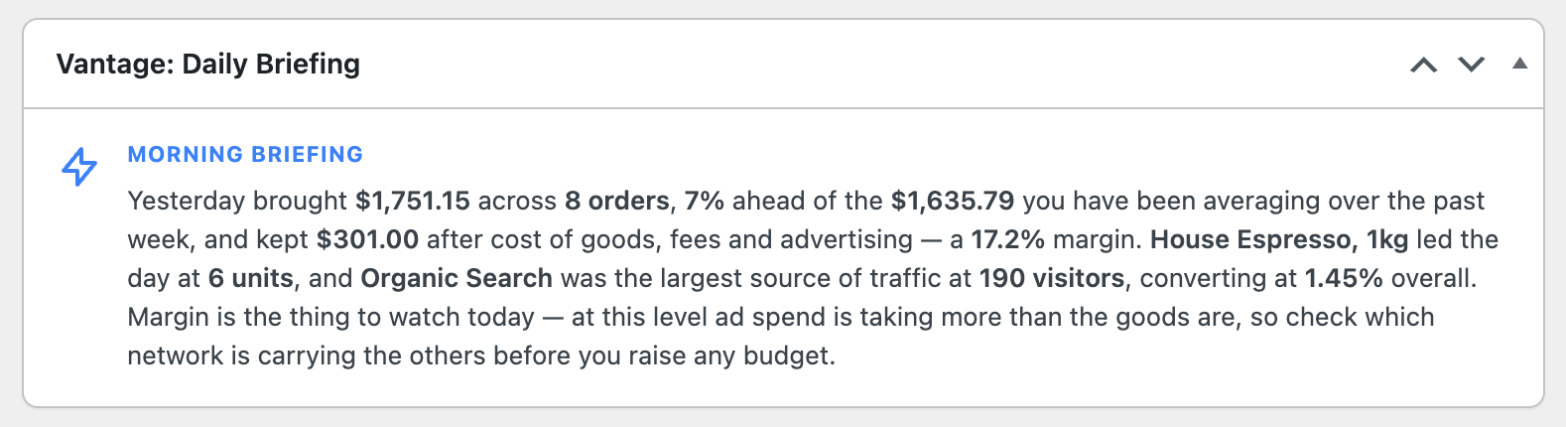
No second login, no data leaving your server. These are real panels from the live demo.
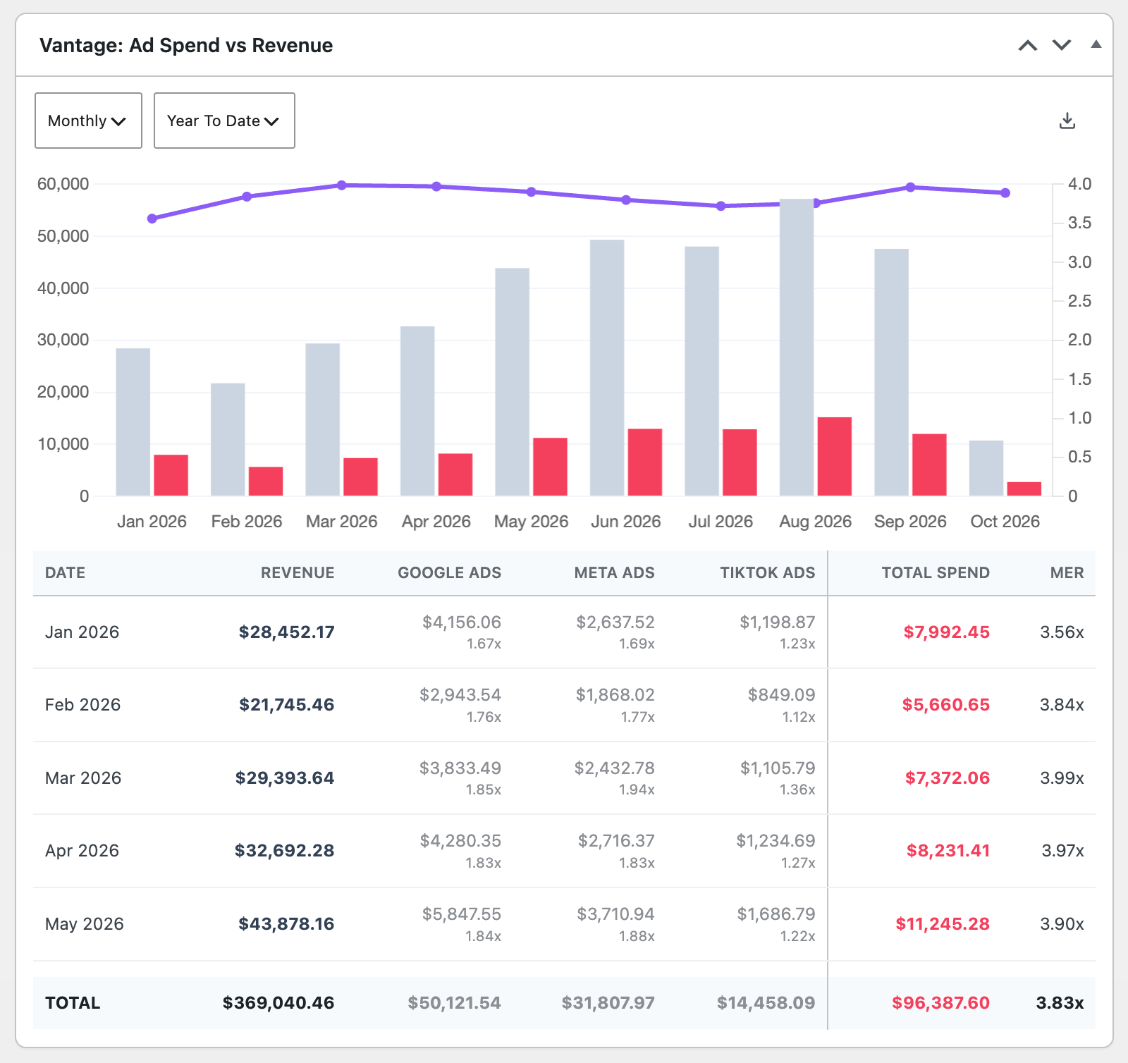 Ad Spend vs RevenueGoogle, Meta and TikTok against revenue, with MER for every monthOpen in the demo
All ten, filled with a real store’s numbers
Eighteen months of orders, refunds, ad spend and traffic behind every panel. You land straight in the WordPress admin — the same place the plugin puts them in yours.
Everything else, grouped by the question it answers
Where is the money coming from?
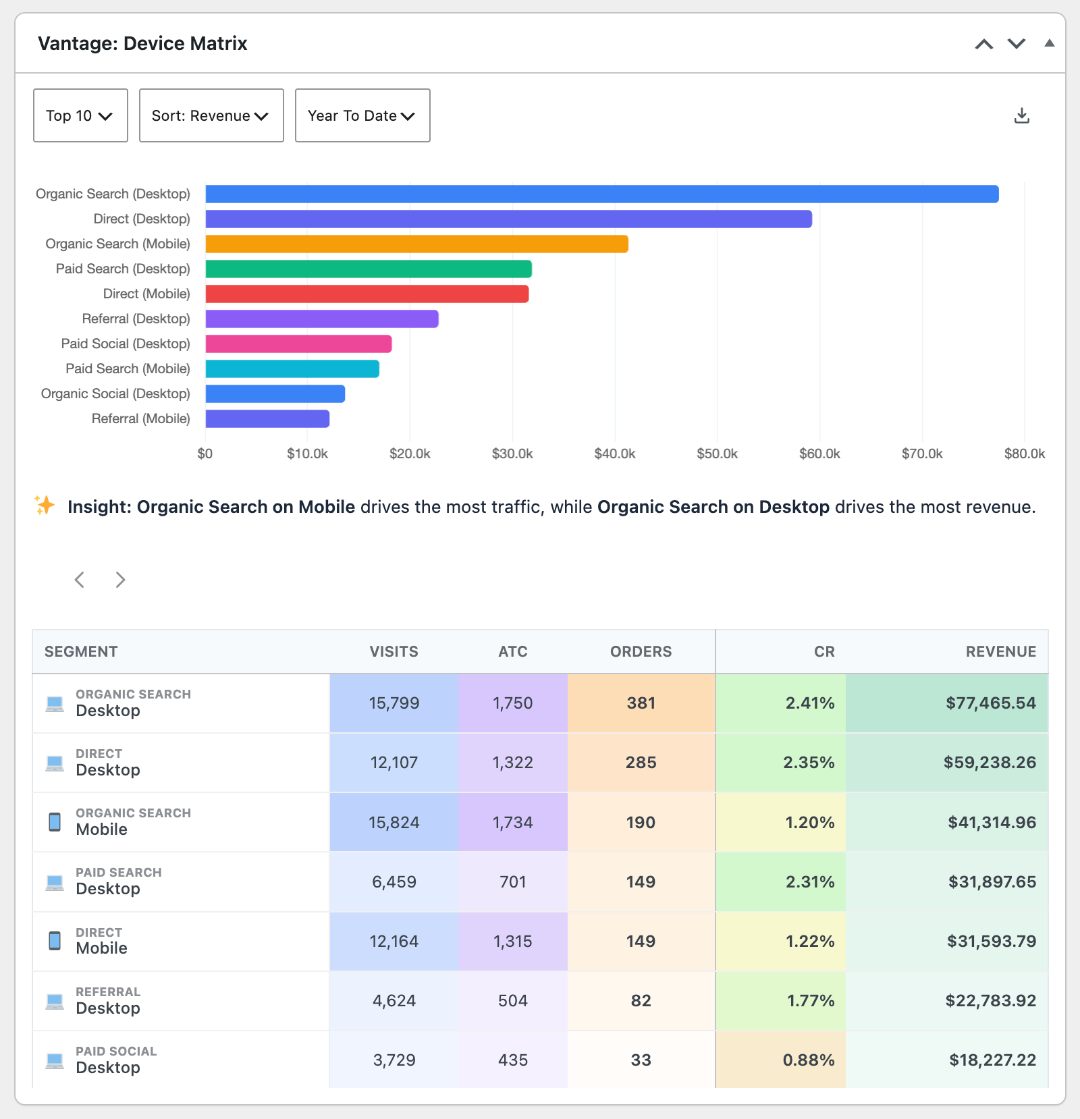
Traffic by channel with conversion rate per channel, the device cross-tab, geography by revenue, top customers by lifetime value, and dormant customers with revenue at risk.
What is worth selling?
Profit by product and category, refund rate per product, coupon usage and what each code gave away, and the new-versus-returning split with repeat rate.
Where is the business heading?
Pacing projections for the month and the year, long-term revenue and profit over three or five years, and like-for-like comparison against the same stretch last period.
What do I tell other people?
CSV on every table, branded PDF reports, shareable read-only report links, and a daily or weekly digest by email.
Compare
Free versus Ultimate
| What you get | Free | Ultimate |
|---|---|---|
| The basics | ||
| Revenue, orders and average order value | ||
| Pacing for today, this month and this year | ||
| Historical trends, top products and categories | ||
| Payment channels and refund history | ||
| New vs returning revenue, with repeat rate | ||
| CSV download on every table | ||
| Costs and profit | ||
| Cost of goods, captured per order line | ||
| Payment fees, from the gateway or your average | ||
| True net profit, by month and by product | ||
| Refund rate by product, as a cohort | ||
| Acquisition | ||
| Ad spend from Google, Meta and TikTok | ||
| MER and per-network ROAS | ||
| Traffic, devices, geography and customer value | ||
| Search terms, content and SEO keywords | ||
| Reporting and AI | ||
| AI briefing, chat, bundles and emails | ||
| PDF, shared reports and emailed digests | ||
| Your own branding and widget defaults | ||
What it needs, and what it does not
Runs on your own server
Orders, customers, costs and margins are read from your own database and never sent anywhere.
WooCommerce 10.9+, WordPress 6.9+, PHP 7.4+
No other plugin required, and nothing runs on the front end of your shop.
Ad spend needs your ad accounts
Google, Meta and TikTok, because nothing inside WooCommerce can see what you spent.
Visitor counts need an analytics provider
GA4, Plausible or Jetpack Stats. Collecting visitors first-party is the largest thing on the roadmap.
Fixed monthly costs are not in the profit figures yet
Profit after cost of goods, fees and advertising — before rent and salaries. Fixed costs and a true break-even are next.
One price, every feature. No add-ons.
Every tier includes every feature. The only difference is how many stores you may run it on.
Annual is roughly two months free on every tier. Lifetime is a real lifetime — it pays for itself in just over three years, then costs nothing.
Single Site
$89.79
one store
- Save 15% against monthly — nearly two months free
- Works out at $7.48 a month
- One renewal a year, one invoice
- Most flexible — cancel any time
- Every Ultimate feature from the first month
- Save 15% by switching to annual
- Pays for itself in 3.2 years, then costs nothing
- Updates and support included, no renewal
- No price rises, ever
10 Sites
$389.79
up to ten stores
- Save 18% against monthly — the biggest saving of the three
- $3.25 per store, per month — less than half the single-site rate
- Costs what 4.3 single licences would, and covers ten
- Most flexible — cancel any time
- $3.98 per store, per month
- Save 18% by switching to annual — the biggest saving of the three
- Pays for itself in 3.1 years, then costs nothing
- $119 per store, once
- Updates and support included, no renewal
Unlimited
$1,189.79
unlimited stores
- Save 17% against monthly — two months free
- Cheaper than ten-packs from about 31 stores
- No counting sites, ever
- Most flexible — cancel any time
- Every store you run, from the first month
- Save 17% by switching to annual
- Pays for itself in 3.2 years, then costs nothing
- Every store you ever launch, covered
- Updates and support included, no renewal
14 days free, no card. Install it, connect your costs, and look at a fortnight of your own numbers before you decide. Lifetime is a real lifetime — updates and support included, no renewal.
Questions people actually ask
Will this slow my site down?
It computes a daily summary once and reads from that, so the dashboard does not re-crunch your order table every time you open it. Nothing runs on the front end of your shop at all.
I have three years of orders. Will it cope?
Yes. The first sync works through your history in batches and tells you how far it has got. After that it is incremental.
What happens when my licence ends?
The plugin keeps working as the free version. Your cost-of-goods figures stay in your database — they are yours, and we do not delete them.
Do you see my store’s data?
No. Everything is computed and stored on your own server. The only things that leave are the ones you connect yourself, and those go to Google, Meta or your AI provider directly, on your own credentials.
Can I use it on client sites?
That is what the 10 Sites and Unlimited tiers are for, and the reports can carry your own name and colours.
Does the free version expire?
No. It is on WordPress.org, it stays free, and it is genuinely useful on its own.
Look at a real store first
A live install with eighteen months of data behind it — cost of goods, ad spend, refunds, the lot. Nothing to sign up for.